Choosing a VPS for Penetration Testing: Provider Comparison December 2025
Most VPS providers ban pentesting. Here's why I use a dual-VPS architecture and a comparison of 7 providers with verified December 2025 pricing and policies.

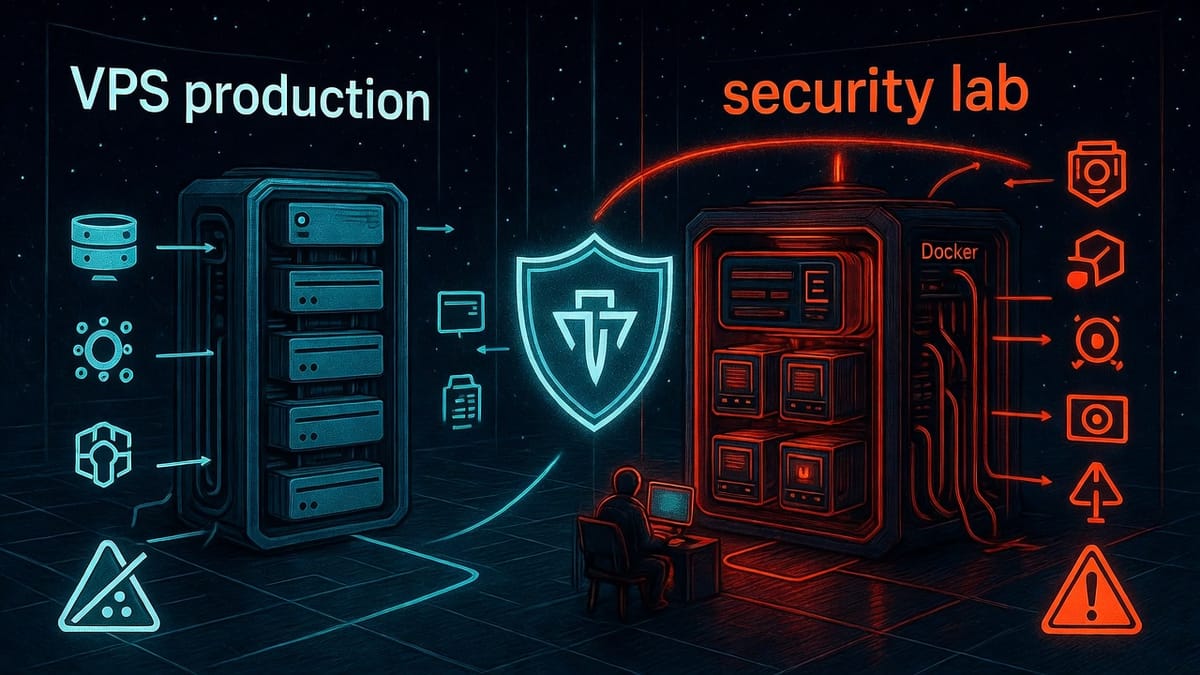
Building a proper penetration testing lab requires more than just finding the cheapest VPS. You need a provider that explicitly allows offensive security testing, offers sufficient resources for modern tools, and won't suspend your account mid-engagement.
After analyzing seven major providers, reviewing their Terms of Service, and testing resource requirements with security tool containers, the analysis revealed that several popular choices have policies that restrict or prohibit security testing.
More importantly, I learned why separation of concerns matters: running two VPS instances—one for production services, one for security testing—provides operational resilience. If the pentesting VPS gets flagged or suspended (which can happen even with authorization, based on community reports), production infrastructure stays online.
Here's what the analysis revealed, with verified December 2025 pricing and policies.
The Dual-VPS Architecture
Before diving into the provider comparison, here's the recommended production setup:
Production VPS (Hostinger KVM 2): $7.49/month
- n8n workflow automation
- Vaultwarden password manager
- Ollama LLM API
- Other production services
Security Testing VPS (OVHcloud VPS-1): $4.20/month
- Kali pentest tools
- Mobile security tools
- Web3 security tools
- Metasploit framework
Total Monthly Cost: $11.69
Why Two VPS Instances?
Separation of concerns. If the security testing VPS gets suspended (even with proper authorization, providers make mistakes), production services stay online. Blog keeps running, automation workflows continue, password manager remains accessible.
This isn't paranoia—it's operational maturity. When running offensive security tools, limiting the blast radius of any potential issues is a reasonable precaution.
The Problem: Policy Restrictions Are Common
Before diving into provider comparisons, understand this: several major VPS providers explicitly prohibit or restrict penetration testing in their Terms of Service. Note: The pricing and policies in this comparison were verified in December 2025. Providers may update these at any time—always check current ToS before deploying.
What "Prohibited" Looks Like
DigitalOcean's Acceptable Use Policy states:
"You may not attempt to probe, scan, penetrate, or test the vulnerability of a DigitalOcean system or network, or to breach the DigitalOcean security or authentication measures... without DigitalOcean's prior written consent."
This isn't about testing their infrastructure—this applies to testing from their infrastructure. Deploy nmap on a DigitalOcean Droplet and scan an authorized target? You're violating their ToS.
Hetzner's System Policies are even stricter:
"The scanning of foreign networks or foreign IP addresses [is prohibited]."
Community reports show Hetzner actively monitors for scanning activity and suspends accounts aggressively. Users report servers being suspended within 1-2 hours of starting port scans.
The Real-World Impact
Getting suspended mid-engagement isn't just embarrassing—it can have serious consequences:
- Active engagements interrupted - Shell catchers go offline, connections drop
- Client impact - Explaining why testing infrastructure disappeared
- Data loss - Scan results, notes, configurations gone
- Time waste - Hours rebuilding infrastructure on a new provider
- Production collateral damage - If production and testing share a VPS, BOTH go down
This makes provider selection critical, not optional.
Resource Requirements: What You Actually Need
Before comparing providers, let's establish baseline requirements for running security testing tools in Docker containers:
Resource Usage - Real Numbers
At Rest (Idle State):
- RAM: 2-3GB baseline (containers running, waiting for commands)
- CPU: <5% (monitoring and health checks only)
- Disk: ~15GB (Docker images + volumes)
Under Load (Active Scanning):
- RAM: 4-6GB (multiple tools running concurrently)
- CPU: Variable, can spike to 60-90% during intensive scans
- Disk I/O: Moderate (log writes, result storage)
Note: These are estimates based on typical security testing workflows. Your actual resource needs will vary depending on scan intensity, target count, and tool selection.
Minimum vs Comfortable Specs
Minimum (Budget Constrained):
- 4GB RAM, 2 vCPU, 40GB SSD
- Outcome: Works but you'll hit resource limits frequently
Comfortable (Recommended):
- 8GB RAM, 4 vCPU, 75GB SSD
- Outcome: Run multiple tools simultaneously without bottlenecks
For this comparison, I'm targeting the "comfortable" tier—8GB RAM minimum for security testing.
Provider Comparison Matrix (December 2025 Pricing)
Here's the complete comparison with verified December 2025 pricing, policies, and specifications:
| Provider | Plan | Monthly Cost | RAM | vCPU | Storage | Pentest Policy |
|---|---|---|---|---|---|---|
| OVHcloud | VPS-1 | $4.20 | 8GB | 4 | 75GB SSD | ✅ ALLOWED |
| Hetzner | CX33 | ~$5-6 | 8GB | 4 | 80GB | ❌ PROHIBITED |
| Hostinger | KVM 2 | $7.49 | 8GB | 2 | 100GB NVMe | ❓ UNCLEAR |
| AWS Lightsail | 8GB | $44 | 8GB | 2 | 160GB SSD | ✅ ALLOWED |
| DigitalOcean | Basic | $48 | 8GB | 4 | 160GB | ❌ PROHIBITED |
| Linode/Akamai | Shared | $48 | 8GB | 4 | 160GB | ❓ UNCLEAR |
| Vultr | High Perf | $120 | 8GB | 4 | 120GB | ⚠️ RISKY |
The $4.20 vs $120 Paradox
The cheapest pentest-friendly VPS (OVHcloud at $4.20/month) offers comparable resources to more expensive options while having a clearer pentesting policy. For security testing use cases, policy clarity often matters more than raw specs—though performance requirements will vary by workload.
Detailed Provider Analysis
OVHcloud (RECOMMENDED for Security Testing)
Current Pricing (December 2025):
- VPS-1: $4.20/month
- 8GB RAM
- 4 vCores
- 75GB SSD
- 400 Mbps bandwidth, unlimited traffic
- Daily backup included
- Anti-DDoS protection included
Penetration Testing Policy:
OVHcloud has the clearest, most permissive pentesting policy, codified in their General Terms of Service (Article 3.13):
✅ Explicitly allows client-initiated penetration testing
✅ No prior notification required from OVHcloud
✅ Must have authorization from target systems (standard legal requirement)
⚠️ Tests must be limited to your own services/instances only
⚠️ Cannot target OVHcloud's shared infrastructure
📋 Written audit report must be produced and provided on request
Why This Matters:
This policy means you can:
- Deploy nmap, nuclei, masscan without notification
- Run reconnaissance on authorized targets
- Test web applications with Burp Suite, sqlmap
- Conduct mobile app security testing
Verdict: BEST VALUE for security testing—explicit legal protection at $4.20/month.
Hetzner (CHEAP BUT PROHIBITED)
Current Pricing (December 2025):
- CX33: €5.49-6.59/month (~$5-6 USD)
- 8GB RAM
- 4 vCPU
- 80GB SSD
- 20TB traffic (EU), 1TB (US)
Why This Looks Tempting:
€5.49/month for 8GB RAM is incredibly cheap—even cheaper than OVHcloud. If Hetzner allowed pentesting, this would be the clear winner.
Penetration Testing Policy:
Hetzner has one of the most restrictive policies:
❌ System Policies prohibit port/network scans
❌ Active abuse monitoring with automatic detection
❌ Users report filling out abuse forms repeatedly to avoid shutdown
Real Community Experiences:
Reddit and LowEndTalk threads show consistent patterns:
- Accounts suspended within 1-2 hours of starting nmap scans
- Abuse reports filed automatically by monitoring systems
- Support response: "Our ToS prohibits scanning, regardless of authorization"
Verdict: The price is incredible, but Hetzner's aggressive abuse monitoring makes it completely unsuitable for offensive security work. AVOID for pentesting.
Hostinger (Production Only)
Current Pricing (December 2025):
- KVM 2: $7.49/month
- 8GB RAM
- 2 vCPU
- 100GB NVMe
- 8TB bandwidth
Penetration Testing Policy:
- ❓ No published policy regarding security testing
- General ToS prohibits "unauthorized access attempts" (vague)
- No community reports of pentest-related suspensions found
Why Hostinger for Production:
- ✅ Excellent value ($7.49 for 8GB RAM)
- ✅ Fast NVMe storage (100GB)
- ✅ Suitable for standard production workloads
Caveat: Without an explicit policy on security testing, verify with Hostinger support if your production services might generate traffic patterns that could be flagged.
Why NOT Hostinger for Security Testing:
- ❌ No explicit pentest-friendly ToS (legal uncertainty)
- ❌ Only 2 vCPU (vs OVHcloud's 4 vCPU)
- ❌ Not worth the risk when OVHcloud explicitly allows it
Verdict: RECOMMENDED for production, NOT RECOMMENDED for pentesting.
DigitalOcean (AVOID)
Current Pricing (December 2025):
- Basic Droplet 8GB: $48/month
- 8GB RAM
- 4 vCPU
- 160GB SSD
Penetration Testing Policy:
DigitalOcean's Acceptable Use Policy explicitly prohibits offensive security testing:
❌ "May not attempt to probe, scan, penetrate, or test the vulnerability"
❌ Requires explicit written permission from DigitalOcean
❌ No documented process for obtaining permission
Verdict: At $48/month with an explicit pentest ban, DigitalOcean is both expensive (11x OVHcloud) and legally risky. Hard pass.
AWS Lightsail (Acceptable but Expensive)
Current Pricing (December 2025):
- 8GB Plan: $44/month
- 8GB RAM
- 2 vCPU
- 160GB SSD
- 5TB transfer
Penetration Testing Policy:
AWS has a mature, well-documented policy:
✅ No approval required for testing YOUR AWS resources
✅ Permitted: EC2, Lambda, RDS, S3, CloudFront, ELB
❌ Prohibited: DDoS testing, AWS infrastructure
When to Choose AWS:
- Your organization already uses AWS (billing consolidation)
- You need US-based IP addresses (some bug bounty programs require it)
- Compliance requirements mandate AWS
Verdict: Lightsail is acceptable but 10x the cost of OVHcloud for similar specs. Worth it only for specific use cases.
Linode/Akamai (Policy Uncertainty)
Current Pricing (December 2025):
- Shared CPU 8GB: $48/month
- 8GB RAM
- 4 vCPU
- 160GB storage
- 5TB transfer
Penetration Testing Policy:
Linode/Akamai's policy is unclear. No published penetration testing policy exists in their ToS or documentation.
What This Means:
- ⚠️ Not explicitly prohibited (unlike DigitalOcean, Hetzner)
- ⚠️ No protection if abuse complaints trigger suspension
- ⚠️ Policy could change without notice
Verdict: At $48/month with policy uncertainty, Linode offers no advantage over AWS (which has clear permission) or OVHcloud (which is 11x cheaper).
Vultr (Expensive and Risky)
Current Pricing (December 2025):
- High Performance 8GB: $120/month
- 8GB RAM
- 4 vCPU
- 120GB SSD
- 10TB bandwidth
Penetration Testing Policy:
Vultr's Acceptable Use Policy states:
⚠️ Port scanning "only permitted if explicitly authorized by the destination host"
⚠️ Automated suspension if traffic "trips security parameters"
⚠️ Community reports show suspensions from legitimate testing
Verdict: At $120/month for the High Performance 8GB tier, Vultr is significantly more expensive than alternatives with clearer policies. The "High Performance" designation may offer better hardware, but the policy uncertainty reduces its appeal for security testing. Consider alternatives like OVHcloud or AWS Lightsail with explicit permission.
Decision Framework
Provider Selection by Use Case
For Security Testing:
| Priority | Winner | Price | Why |
|---|---|---|---|
| 1st | OVHcloud VPS-1 | $4.20/mo | Explicit permission, best value |
| 2nd | AWS Lightsail | $44/mo | Clear policy, US-based IPs |
For Production Services:
| Priority | Winner | Price | Why |
|---|---|---|---|
| 1st | Hostinger KVM 2 | $7.49/mo | Best value, solid uptime |
| 2nd | OVHcloud VPS-1 | $4.20/mo | If single-VPS strategy |
The Policy Clarity Spectrum
| Category | Providers | Risk Level |
|---|---|---|
| ALLOWED | OVHcloud, AWS | Low |
| PROHIBITED | Hetzner, DigitalOcean | High (ToS violation) |
| RISKY | Vultr | High (suspension) |
| UNCLEAR | Hostinger, Linode | Medium |
Rule: Only use ALLOWED providers for security testing. UNCLEAR is production-only.
Final Recommendation: Dual-VPS Strategy
After analyzing policies, testing resource requirements, and running infrastructure for months, here's the recommended setup:
Recommended Setup (Dual-VPS)
For Security Testing: OVHcloud VPS-1
- $4.20/month (8GB RAM, 4 vCPU, 75GB SSD)
- Explicit pentest-friendly ToS (legal protection)
- No pre-notification required
- Daily backups included
- Unlimited traffic with anti-DDoS
For Production Services: Hostinger KVM 2
- $7.49/month (8GB RAM, 2 vCPU, 100GB NVMe)
- Excellent value and uptime
- Fast NVMe storage
- NOT for security testing (policy unclear)
Total Cost: $11.69/month
Why This Works:
- ✅ Separation of concerns (security testing isolated from production)
- ✅ If pentesting VPS suspended → production unaffected
- ✅ Legal clarity (OVHcloud explicitly allows testing)
- ✅ Cost-effective (under $12/month for both use cases)
Single-VPS Alternative (Budget Constrained)
If $12/month is too expensive, use OVHcloud only ($4.20/month). You get pentest-friendly ToS plus can run production services. But dual-VPS is worth the extra $7/month for operational resilience.
Other Options Worth Considering
This comparison focused on mainstream VPS providers. Other options exist:
- Google Cloud / Azure: Both allow security testing with notification requirements
- Dedicated pentest platforms: BreachLock, Cobalt have purpose-built infrastructure
- Self-hosted labs: For purely internal testing, no provider restrictions apply
Common Mistakes to Avoid
Mistake 1: Choosing Based on Price Alone
Why it fails: Hetzner is ~$5/month but community reports indicate aggressive monitoring for scanning activity.
Lesson: Policy clarity is worth paying for.
Mistake 2: Assuming "Popular" Means "Pentest Friendly"
Why it fails: DigitalOcean is the default choice for many developers, but their ToS explicitly prohibits security testing—and at $48/month, they're not even cheap.
Lesson: Read the ToS before deploying security tools.
Mistake 3: Running Production and Testing on Same VPS
Why it fails: Security testing triggers suspension → production goes down with it.
Lesson: Separate production from testing. Worth the extra $7/month.
Mistake 4: Undersizing Resources
Why it fails: 2GB RAM sounds sufficient until you try running nuclei + nmap + sqlmap simultaneously.
Lesson: Budget for 8GB RAM minimum for testing.
Conclusion
Choosing a VPS for penetration testing isn't about finding the cheapest option—it's about finding the provider that explicitly allows your work, offers sufficient resources, and won't suspend your account mid-engagement.
The $4.20 vs $120 paradox tells the whole story: OVHcloud offers more resources AND explicit pentesting permission at 1/30th the cost of Vultr.
Recommended Setup:
- ✅ OVHcloud VPS-1 ($4.20/month) - Security testing with explicit legal protection
- ✅ Hostinger KVM 2 ($7.49/month) - Production services with excellent uptime
- ✅ Total: $11.69/month for professional dual-VPS architecture
Why OVHcloud Wins:
- Explicit pentest-friendly ToS (Article 3.13)
- Best value at $4.20/month for 8GB/4vCPU
- Unlimited traffic with anti-DDoS
- Daily backups included
The dual-VPS architecture provides operational resilience—if testing infrastructure gets suspended, production stays online. That's worth the extra $7/month.
Sources
Provider Pricing (Verified December 2025)
- OVHcloud VPS Pricing
- Hostinger VPS Hosting
- Hetzner Cloud Pricing
- DigitalOcean Droplet Pricing
- AWS Lightsail Pricing
- Linode/Akamai Pricing
Terms of Service / Penetration Testing Policies
- OVHcloud General Terms of Service - Article 3.13
- OVHcloud Penetration Testing Help
- DigitalOcean Acceptable Use Policy
- Hetzner System Policies
- Vultr Acceptable Use Policy
- AWS Penetration Testing Policy